


SecurityNet:  FAQs

Everything you need to know about how SecurityNet keeps your data private, secure, and under your control

In a world where data is constantly collected, copied, and analysed, true privacy has become rare. 

SecurityNet is built to change that — providing direct, end-to-end encrypted communication that never passes through third-party servers, never stores copies in the cloud, and never collects or exposes metadata within SecurityNet itself. (Only your ISP or VPN may still see basic connection details such as IP addresses — outside SecurityNet’s control.)

This FAQ will guide you through why that matters, how SecurityNet protects you, and how to make the most of its privacy-first design.

Your data should belong to you — and with SecurityNet, it finally does.


Why SecurityNet Matters

  • What Makes SecurityNet Different?
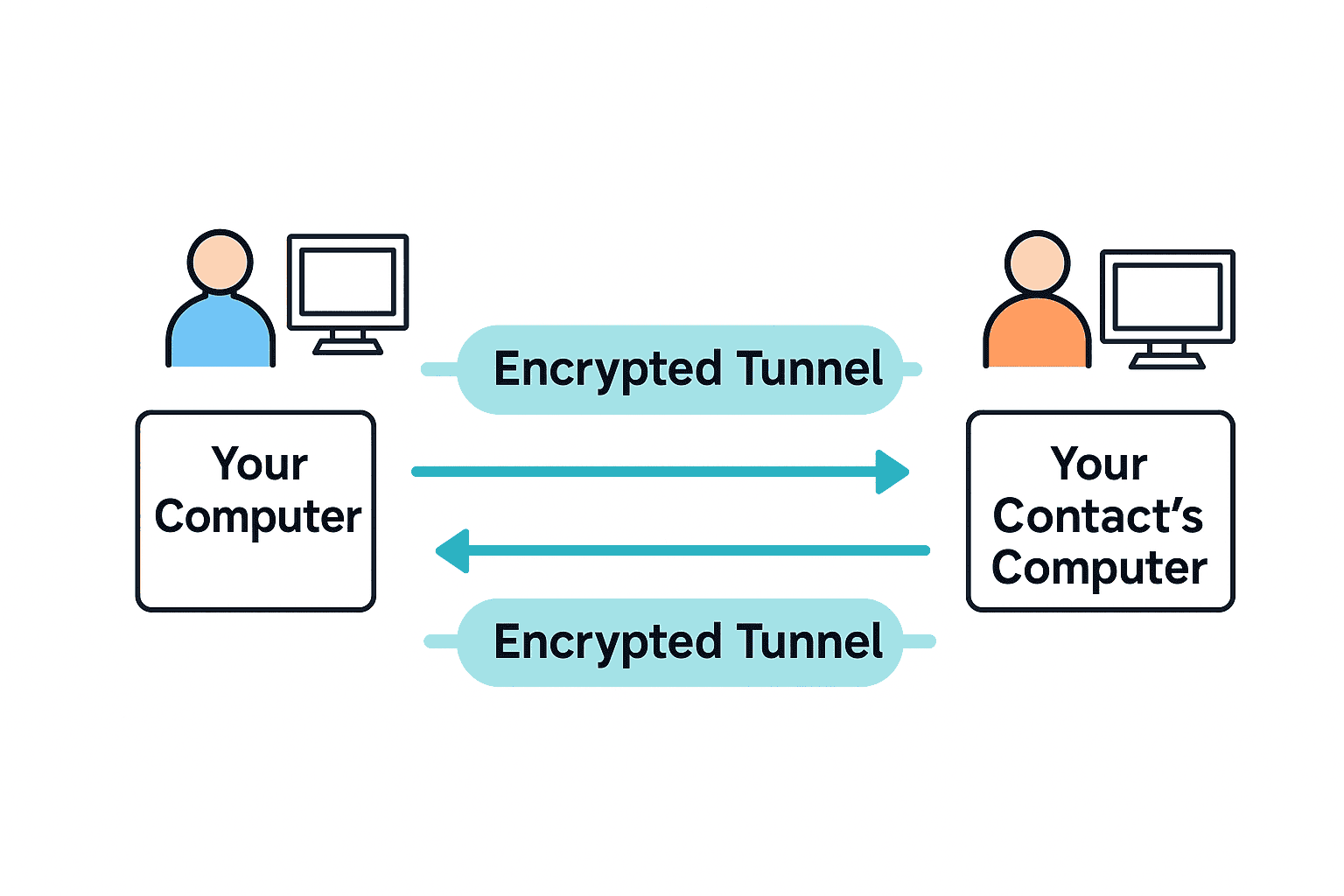
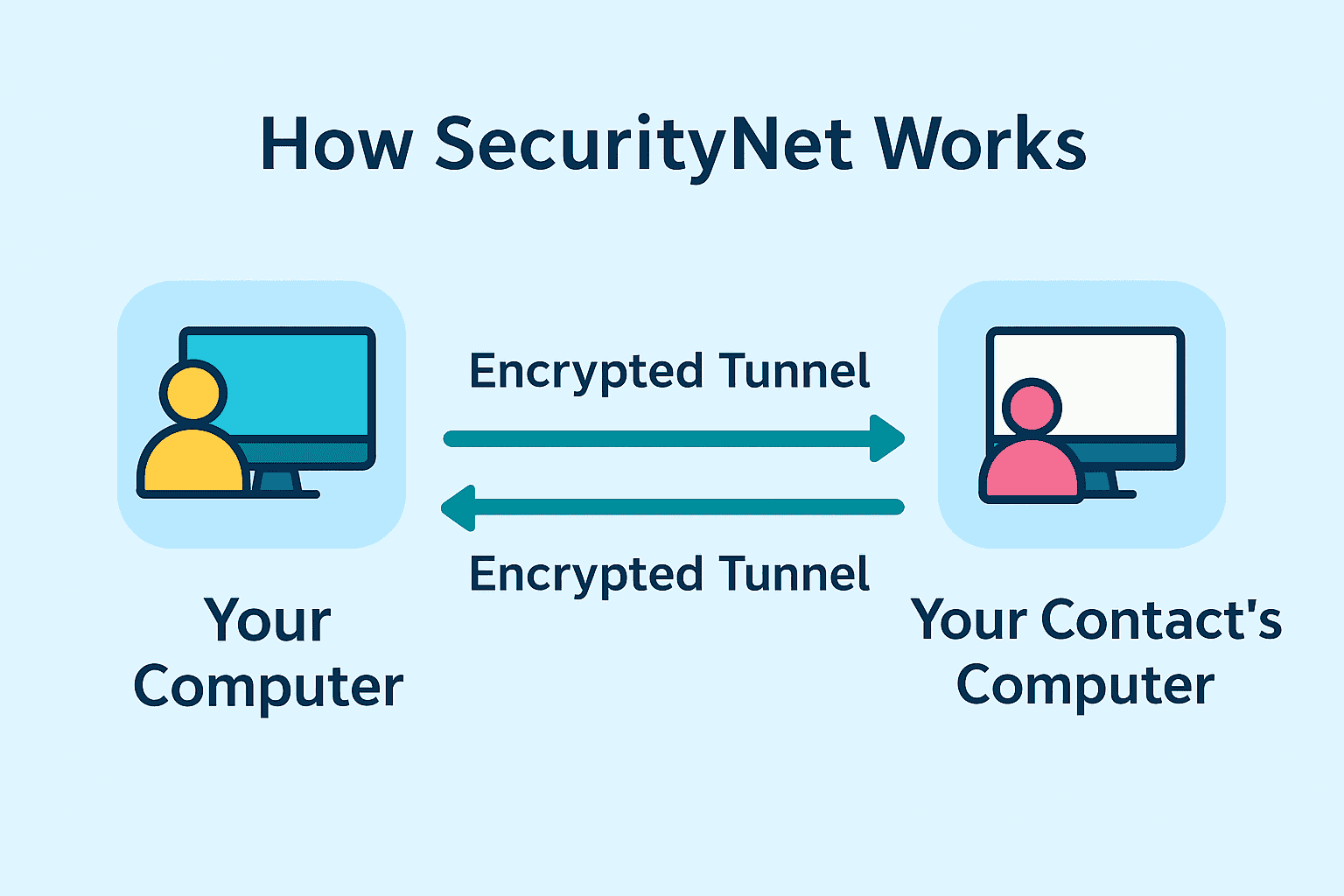
    SecurityNet doesn’t just encrypt — it disconnects you from central control. There’s no cloud, no tracking, no hidden logs. You own your invitation-only communication channel entirely. SecurityNet doesn’t store or route your data through anyone’s servers — not even ours. When you send a file or message, it goes directly from your computer to your contact’s computer, fully encrypted end-to-end.                                                              
  • More… Read more about how SecurityNet is different from every other 'secure' platform out there                                                                                                                                                                               
  • Can SecurityNet replace email
    For many private communications, yes. SecurityNet includes direct chat messaging and secure file transfer between trusted computers. Documents, PDFs, spreadsheets, images, notes, and other files can be exchanged directly without relying on centralized mail servers or cloud-based messaging platforms. Many users choose SecurityNet when they want greater control over where their communications are stored and who has access to them.                                                                                                                                                                     
  • Why should I use SecurityNet instead of email?
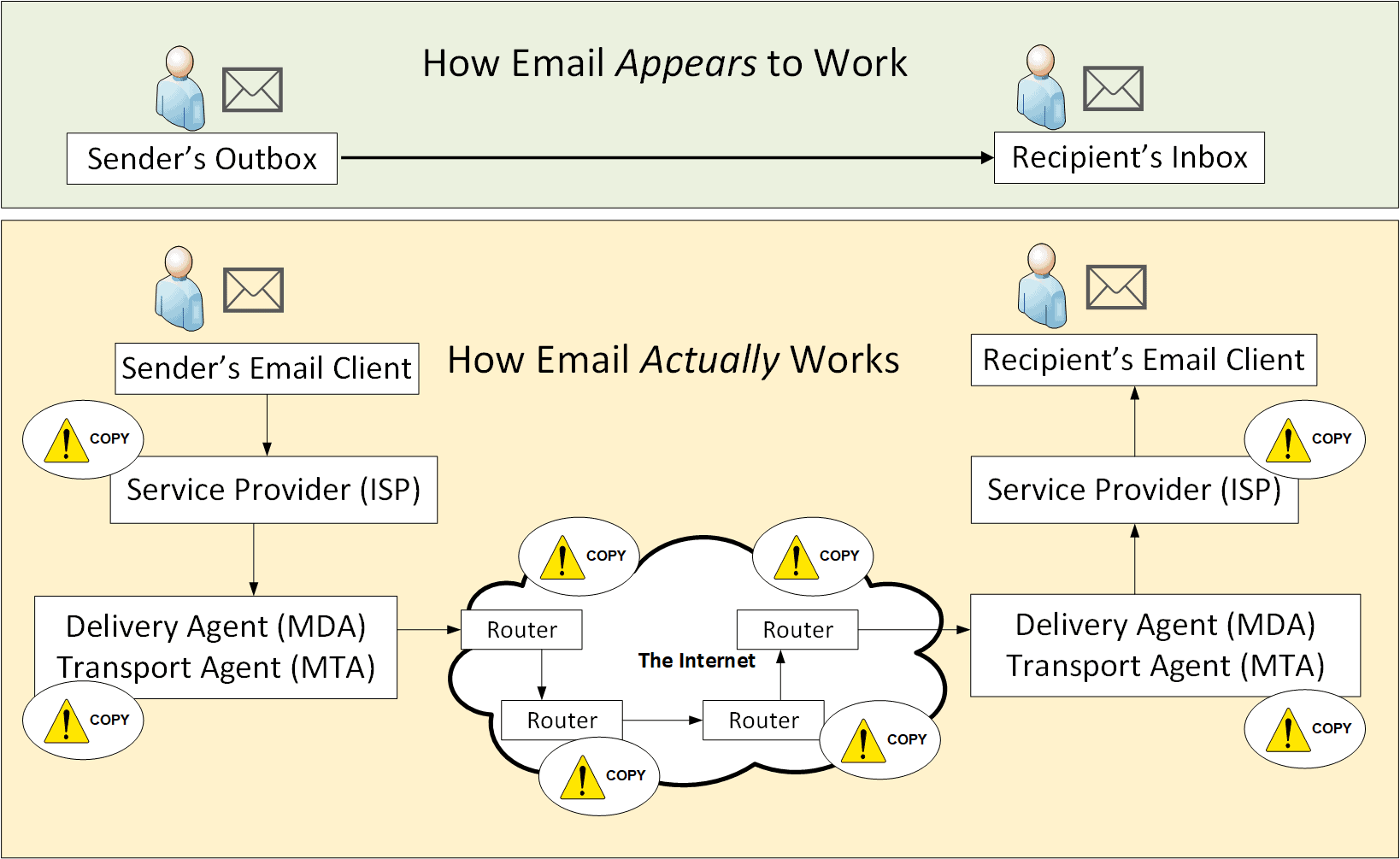
    Email was never designed with privacy in mind. Even encrypted emails expose metadata — like who you contact, when, and how often — and copies can linger on servers you don’t control. SecurityNet creates a direct, end-to-end encrypted connection between devices, with no third-party servers, no residual copies, and no collection or storage of metadata by SecurityNet itself.              
  • More… See why traditional email leaves behind metadata, copies, and digital footprints — even when it’s encrypted.                                                                                                                                                                               
  • Is communication on SecurityNet moderated or controlled by any platform? 
    SecurityNet does not rely on social platforms, messaging services, accounts, or central servers. Communication occurs directly between trusted participants, which means there is no moderation layer, algorithmic filtering, or platform-based control within the system itself.  Because SecurityNet operates independently of third parties, conversations are not subject to content policies, visibility rules, or account enforcement. Control remains entirely with the participants involved.                                                                                                                                                    
  • Why doesn’t SecurityNet run on mobile phones? 
    Mobile devices constantly track and transmit data — often without your knowledge — making them inherently less private. By operating exclusively on desktop, SecurityNet avoids telemetry, background data collection, and OS-level tracking. This ensures your communications stay completely within your control.                                             
  • More… Learn how phones constantly leak data — and why staying off mobile is key to real privacy.                                                                                                                                                                                      
  • Can SecurityNet be used over mobile hotspots?
    SecurityNet works over mobile hotspots, but transfer speed and reliability depend on signal strength and network quality. SecurityNet encrypts all data before it leaves your computer, so hotspot networks, Internet providers, and mobile carriers cannot read your messages or files. Weak or unstable mobile signals may cause slower transfers or temporary connection retries, particularly when sending large files. When using mobile data in weak signal areas, USB tethering is generally more reliable than Wi-Fi hotspot mode. Large transfers may occasionally retry automatically depending on signal quality.                                                                                                                                                                                         
  • Why doesn’t SecurityNet use the cloud? 
    Cloud storage always involves trade-offs: copies are created and replicated, providers can be compelled to hand over data, and metadata is often logged. SecurityNet avoids all of this by never storing your data anywhere — once a file is delivered, it disappears from the network with no backups and no server-side metadata retained.   
  • More… Discover how cloud storage exposes your data through copies, legal access, and metadata — and why SecurityNet avoids it.                                                                                                                                                                                      
  • How does SecurityNet’s encryption actually work? 
    SecurityNet uses strong, modern encryption to create a direct, end-to-end encrypted tunnel between your device and your contact’s device. Files and messages never pass through third-party servers, are never stored in the cloud, and cannot be intercepted or read in transit. Once delivered, they disappear from the network, leaving no residual copies or metadata stored by SecurityNet.
  • More… Take a deeper look at how SecurityNet’s end-to-end encryption works — and why even metadata disappears.                                                                                                                                                                                 
  • Does SecurityNet support Group Chat?
    Yes. SecurityNet includes an optional Group Chat feature for multi-party communication. It is disabled by default and requires explicit user consent.  One-to-one chat and file transfers do not require Group Chat and continue to operate in fully direct, peer-to-peer mode. Users can enable Group Chat in the Settings section of SecurityNet.                                                                                                                                                       
  • Why does Group Chat work differently from one-to-one communication?
    Group Chat supports offline, multi-participant message delivery.
    To enable this, messages are temporarily relayed in encrypted form so they can be delivered when recipients are not simultaneously online.  In contrast, one-to-one communication in SecurityNet is delivered directly between the two devices using the same secure file-transfer mechanism as encrypted file exchange, and does not require any relay storage.                                                                                                                                                                         
  • Does Group Chat affect SecurityNet’s “no storage” design?
    Group Chat is the only feature that requires temporary encrypted relay storage to function.  All messages remain end-to-end encrypted and cryptographically unreadable to SecurityNet and any third party, but this mode does not follow SecurityNet’s default “no persistent storage” design.
    For this reason, Group Chat is optional and requires explicit user consent.                                                                                         
  • Who can receive Group Chat messages?
    Only users who explicitly enable Group Chat can send or receive group messages.   Participants who do not enable Group Chat:
    ­­ ­-  Will not see Group Chat controls
     -  Will not receive group messages
     -  Remain unaffected and continue using one-to-one communication normally
    Each participant opts in individually; there is no automatic or centralised enablement.

Data Control & Best Practices

  • How can I stay in control of my data?
    Keep sensitive data under your direct control by storing it locally — on encrypted drives, secure NAS devices, or removable encrypted storage — rather than in the cloud. Combine this with SecurityNet’s direct transfer method and you eliminate almost all common data security risks.                                                                                           
  • More… Explore best practices for storing sensitive data securely — from encrypted drives to offline backups.                                                                         
  • What’s the best way to store sensitive files?
    A layered approach works best. Use SecurityNet for encrypted transfer and pair it with encrypted local or offline storage for long-term retention. This keeps your data private, inaccessible to third parties, and fully under your control.                                                     
  • More… Explore best practices for storing sensitive data securely — from encrypted drives to offline backups.

Privacy Recommendations

  • Should I use a VPN?
    A VPN (Virtual Private Network) can improve privacy by hiding your real IP address and encrypting traffic between your device and the VPN server.  SecurityNet works independently of VPNs because all communication between authorised contacts is end-to-end encrypted. A VPN is not required to use SecurityNet.  However, using a VPN can add an extra layer of privacy — especially on public or untrusted networks.                                                                                                                                
  • Are there recommended VPNs?
    If you choose to use a VPN for general privacy purposes, look for providers with strong privacy practices,
    such as audited no-logs policies, strong encryption, and clear legal transparency.. SecurityNet does not endorse specific providers and does not rely on VPNs for its core security model.                                                                                                                                                                         
  • Do I need a Privacy-Focused Browser?
    Yes, yes, YES! While SecurityNet does not interact with any browser, we do advise you to use a privacy-focused browsers for your normal daily use. The Brave Browser incorporates: Cookie Deletion on logout, Browser Fingerprint Obfuscation and Tracker Blocking. Brave's Shields automatically blocks ads, trackers, third-party cookies, and other privacy-invasive elements. You can see exactly what has been blocked through the Shields panel, making it transparent and easier to monitor your privacy. Also Firefox is very good, as long as you add the Ublock Origin extension.  See below for more privacy-focused options.                                                                                                              
  • How can I minimize tracking on other websites?
    Every time you login to Microsoft, Google, YouTube, Facebook - any of these Big Box websites - they track you, aggregate your behavior and sell it on. But if you use different browsers for different purposes, you can stop them from learning everything about you.  I personally use Brave for regular browsing, Firefox for testing, Chrome for anything Google or Meta, and Edge for anything Microsoft.        
  • Brave Browser, Firefox, Mullvad, Epic, Duckduckgo: use any of these privacy-focused browsers for your regular browsing and financial affairs.  They are tracker-free and/or ad-free more or less out of the box. Or they can be easily configured.  And if necessary you can add additional browser extensions like Ublock Origin, Privacy Badger, Location Guard.  I would have added Tor - possibly the most famous - but (in my opinion) it uses so many un-validated hops that you have no idea if anyone is copying your data or not.  Personally, I don't trust Tor, but do your own research.  You have many options to protect your privacy.         
  • Google Chrome: use this only if you ever need to login to a Meta or Google service - any of them.  And I mean YouTube, Google Search, Docs, Facebook, Instagram and all the other free services they offer.  You will have heard this before, but if the service is free, then YOU are the product. They will track everything you do, where you visit, all your likes, and sell that info on to the data brokers - who also sell your data back to the government. This is why separating activities matters for privacy. 
  • Microsoft Edge: use this only if you ever need to login to a Microsoft service, and they will only ever track what you are doing with them.  Don't do any regular browsing here.                          

Plans, Billing & Support

  • What's included in every plan? 
    Every plan includes all features — no locked tiers, no hidden upgrades, and no additional costs. You get full functionality from day one.                                                                                                   
  • Can I upgrade to add more users at any time? 
    Yes. You can upgrade your plan at any time directly from within the SecurityNet app - it takes you to the website where you can select what you need. All your existing data remains untouched, and the process is seamless — no reinstall or reconfiguration required.                                                       
  • What happens if my team grows beyond my current plan? 
    Simply choose the next plan that fits your team size and add more users instantly. For more than 25 users or custom deployments, contact us for tailored enterprise options.                                                                             
  • Do I need to reinstall the software when upgrading?
    No. All your data, contacts, and encrypted communication history stay exactly as they are — upgrades don’t require a new installation.                                                                                                          
  • Do you offer refunds?
    Yes — every new subscription comes with a 30-day money-back guarantee. If SecurityNet isn’t right for you, just let us know within 30 days and we’ll refund you, no questions asked.  (Upgrades or renewals made after the initial 30 days are non-refundable.)                                                            
  • Is there a long-term contract?
    No. Subscriptions are billed month-to-month or annually — your choice — and you can cancel at any time. Annual plans offer a savings of around16% — pay for 10 months, get 12.                                                                                    
  • Can I change between monthly and annual billing later?
    Yes. You can switch plans at your next renewal period. If you’re on an annual plan, we’ll remind you before renewal so you can make any changes.                                                                                                   
  • Is support included (and who can contact support)? 
    Yes. Support is included with every plan at no extra cost. However, only the license owner (the person who purchased or manages the subscription) can raise support tickets or contact the support team.                               
  • Is there a free trial?
    Yes. There is a plan specifically for a 14-day free trial.
    Every plan include a 30-day money-back guarantee.
  • Can I cancel anytime?
    Yes. Monthly plans can be cancelled anytime.
    Annual plans can be refunded within 30 days if you’re not satisfied.