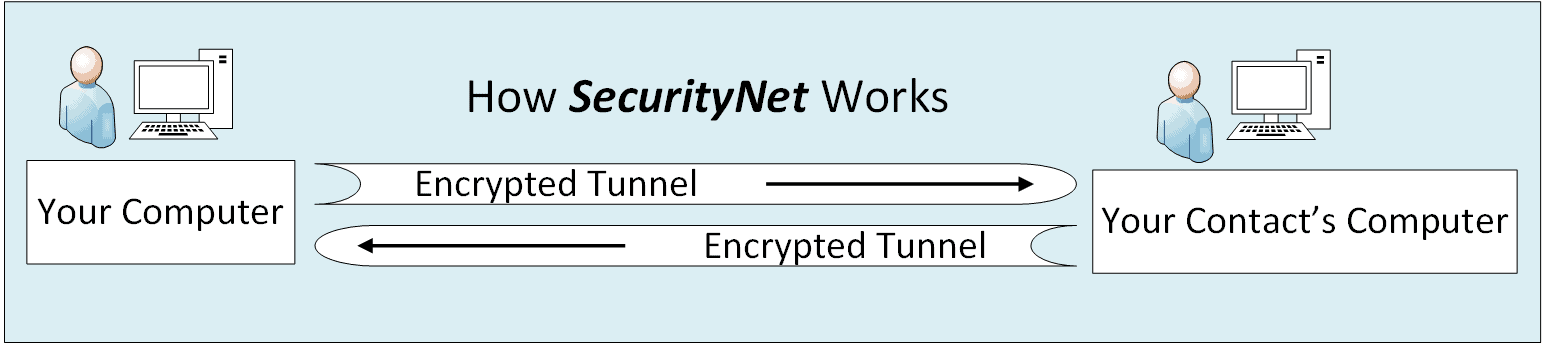
How SecurityNet Works

What actually runs on your systems

Main App:

The Control Panel

Everything begins here  — nothing happens without instruction.

  • Configure settings
  • Select contacts & files
  • Send and receive files and messages

Scanner:

Background Monitor

Runs automatically in the background,  checking for:

  • incoming files & chats
  • items to send
  • matches sender and receiver

Send/Receive 

Encrypted Tunnel

Creates the secure end-to-end encrypted transfer session with:

  • random encryption keys
  • its own secure tunnel
  • new encryption keys for each session
  • Multiple security layers work together to protect every transfer.
  • Your data is not stored on SecurityNet servers, and SecurityNet does not retain server logs of your communication activity.   
  • Interrupted transfers automatically resume securely.

Want to see SecurityNet in action?  Watch the demo.

How You Use SecurityNet

SecurityNet creates private communication networks between people you choose — and you control exactly who joins.

Using SecurityNet follows a simple process.

  • Purchase Your SecurityNet Subscription
    You receive a fixed number of licenses to share with trusted contacts.
  • Invite Trusted Contacts
    Send invitations to the people you want in your private network.
  • Exchange SecurityNet IDs
     Each user installs SecurityNet and exchanges IDs to establish identity.
  • Authorize Each Contact
    No communication begins until you approve them.
  • Communicate Securely
    Messages and files move securely between your trusted computers.

Communicate Without the Cloud

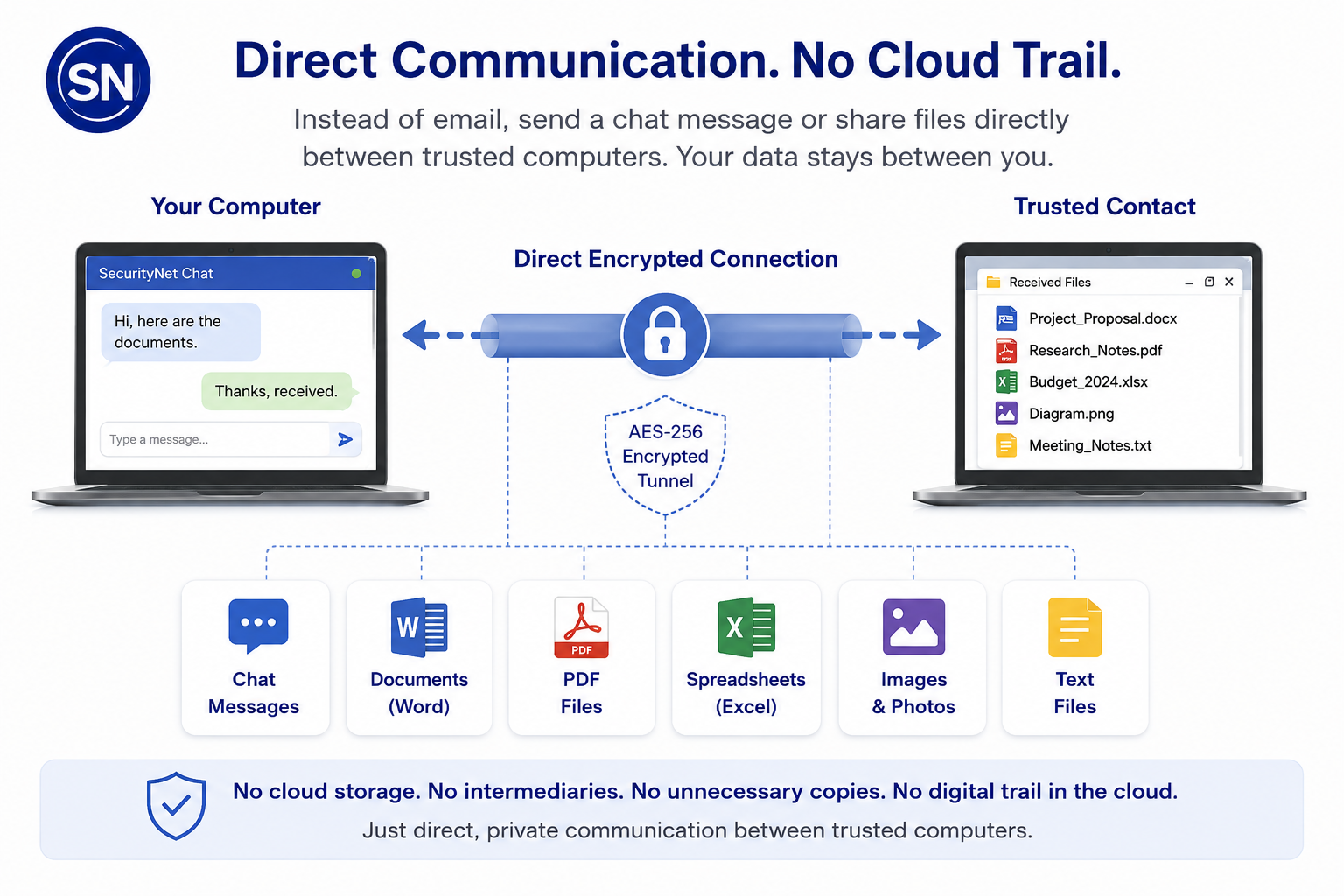
SecurityNet allows trusted computers to exchange chat messages, documents, and files directly through an encrypted connection—without relying on mail servers, cloud platforms, or third-party messaging services.

Why SecurityNet Does Not Use Phones

Most modern messaging ecosystems are designed around mobile-phone identity, contact discovery, broad synchronization, and persistent cloud-connected communication infrastructure.

SecurityNet was designed around a different operational model:

  • trusted communication networks,
  • explicit permission-based access,
  • minimised metadata exposure,
  • and minimised centralised dependency.

The architecture intentionally avoids:

  • phone-number identity systems,
  • automatic contact discovery,
  • mobile ecosystem dependency,
  • and broad synchronization across cloud-connected devices.

This design approach prioritizes operational privacy, controlled trust relationships, and reduced communication exposure over convenience-driven mass connectivity.

For operational privacy and communication control, SecurityNet is designed specifically for desktop and laptop systems.

Visual Architecture & Privacy Diagrams

SecurityNet uses a different communication architecture from other systems:

It focuses on trusted communication, reduced centralised exposure, and minimised metadata visibility.

Explore diagrams explaining:

  • how SecurityNet differs from conventional communication systems,
  • the VPN limitations,
  • layered privacy
  • and trusted-network communication architecture.

How SecurityNet Protects Your Communication

Your data moves directly between computers.

It is never stored or retained on external servers.

  • No central storage
    SecurityNet does not store messages or files on company-owned infrastructure. Communication is established directly between you and your contacts' computers.
  • No identity services
    No phone numbers or centralized identity systems are required.
  • No SecurityNet server logs
    SecurityNet does not retain server-side logs of your communication activity or store communication metadata.
  • End-to-end encryption
    All communication is protected using an AES-256 encrypted tunnel established between computers.

Technical Documentation & Verification

Explore SecurityNet’s architecture documentation, technical presentations, threat model, and observable network verification examples.

Why SecurityNet Doesn’t Use the Cloud

If it’s in the cloud, it’s out of your control.

Cloud storage might seem convenient — but every time your files sit on someone else’s servers, they can be scanned, copied, stored, and backed up without your knowledge.

Even if the service promises encryption, those files still pass through capture points — where data can be logged, archived, or exposed.

SecurityNet takes a completely different approach.

Your data is not stored on SecurityNet servers, is not archived centrally, and is designed to leave as little server-side trace as possible once delivered.

Files and messages travel securely between devices, encrypted end-to-end, using one-time passwords that even SecurityNet itself can’t see or recover.
read more →

SecurityNet establishes encrypted connections between devices, minimising storage, logging, and intermediary exposure risks.

Using an end-to-end encrypted tunnel with one-time-use passwords, SecurityNet protects files as they travel between the sender and recipient, without storing them on SecurityNet servers.

This architecture reduces exposure to server logging, centralised data breaches, and unnecessary third-party access.

It is designed for people and organisations that need to exchange sensitive information securely and privately.


Control Where Your Data Lives

SecurityNet allows your encrypted communication data to be physically separated from the computer itself.

Unlike most communication platforms, encrypted data can be stored on removable or external storage devices.

What this means in practice:

  • encrypted data can live on removable storage
  • no cloud synchronization
  • communication data remains on the selected storage
  • SecurityNet will not start if the drive is absent
  • physical control over where encrypted information exists

Unplug the drive — and SecurityNet message stores, chat data, and transferred files are no longer accessible from the PC.

This design is ideal for shared computers, travel, sensitive work environments, or anyone who wants full control over where their private data lives.

Transmit your data directly from computer  to computer

And by directly we mean: 
  • Data flows securely from your computer to your contact's computer, from end-point to end-point.
  • We use end-to-end AES-256 encryption with a new password for every session. 
  • There is no central communication platform storing your messages or files. 
  • Your files and messages are not stored on third-party communication platforms, reducing unnecessary exposure.
  • Point-and-click, drag-and-drop, end-to-end encryption.
  • No central third-party communication service retains your data.
How do we do this?
  • Firstly, we don't store your data  - unlike the Big Tech boys of this world!  
  • We connect you to your invitation-only contact only while your files are being transmitted.
  • We never touch your data, other than to encrypt and transmit your files directly to your contact.
  • Each session has a new encryption password — even we don't know it.
  • We have a strict no tracking policy -  no tracking, and no SecurityNet server logs.
  • Your business really is YOUR business.  

Why Trust SecurityNet?

At SecurityNet, privacy and protection aren’t features — they are the foundation.
Your data belongs to you alone. That means no SecurityNet server logs, no tracking, and no hidden access.

SecurityNet creates a direct, encrypted path between you and your contacts — with no cloud storage, no central data repository, and no stored copies. Communication flows securely from device to device.

Every SecurityNet release is digitally signed and integrity-validated at runtime.

If the software is modified or corrupted, it refuses to run.

Our philosophy is simple: true privacy means you remain in full control of your network, your data, and your permissions.

  • AES-256 Encryption — files and chats are protected using strong, modern encryption standards.
  • Direct Device-to-Device —  data flows directly between users whenever possible — no cloud storage, no stored copies, no data harvesting.
  • No SecurityNet Server Logs or Tracking — SecurityNet does not store, analyse, or monetise your communication activity. What you share stays private.
  • Controlled Network Membership — within each licensed network, new users must be explicitly approved by the License Owner before they can join the network.

Permissions such as Invite External and Create Groups are disabled by default and must be deliberately enabled by the License Owner.  Group Messaging is also disabled by default and can be enabled by the User if required.

Individual users may establish independent encrypted connections with external licensed users only if authorised. External contacts remain isolated and cannot access internal groups or other network members unless separately approved.

Direct Peer-to-Peer

No Stored Copies

© 2023 - 2026 ZAT TEK LTD — Registered in England and Wales. Company No. 12876462